
If a U.S. store does not ship directly to your country, a freight forwarder can help you receive your order. US Unlocked lets you pay eligible U.S. merchants with a U.S.-issued virtual payment card, while your freight forwarder receives the package in the United States and sends it on to you.
What is a freight forwarder?
A freight forwarder is a company that gives you a U.S. warehouse address for online purchases. When a store ships your order to that address, the forwarder receives it, processes it, and arranges international delivery to your home.
Freight forwarders may also offer services such as package tracking, package consolidation, shipping-method choices, and customs documentation. Shipping costs, delivery times, duties, taxes, and available services are set by the freight forwarder and can vary by destination.
How do I set up a freight forwarder with US Unlocked?
Setting up a freight forwarder is straightforward:
Step 1 – Receive your warehouse address and suite number.
Once your freight-forwarding setup is complete, you will be given a U.S. warehouse address. This normally includes a unique suite, mailbox, or customer number so the forwarder can identify your package.
Step 2 – Create your US Unlocked account.
Register for an account and complete the required information.
Step 3 – Choose your freight-forwarding option.
During setup, select either:
Step 4 – “I need a Freight Forwarder” if you would like US Unlocked to assign a freight-forwarding partner; or “I already have a Freight Forwarder” if you have an existing forwarding account you want to use.
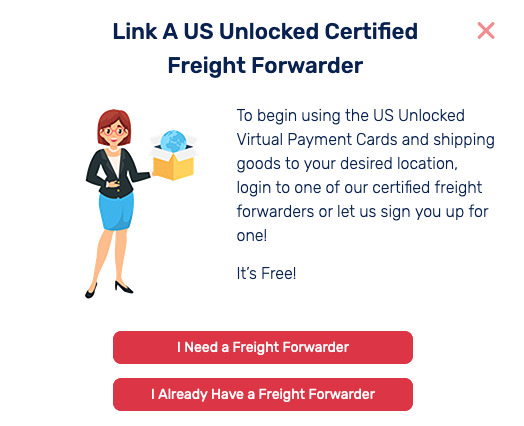
Step 5 – Create and verify your freight-forwarder account.
Make sure you can log in to your freight forwarder’s account or tracking portal. Keep your contact details and delivery address up to date.
Step 6 – Use the warehouse address when you shop.
At checkout on the U.S. retailer’s website, enter your freight forwarder’s warehouse address as the shipping address. Include your suite or customer number exactly as provided.
Step 7 – Track your package to the warehouse.
After the retailer ships your order, use the tracking number to confirm that it arrives at the warehouse. Your freight forwarder may ask you to declare the package contents, value, or shipping preferences before sending it internationally.
Step 8 – Choose international shipping and receive your order.
Select the available shipping option, pay any applicable forwarding, shipping, customs, or import charges, and track the package until it arrives at your delivery address.
Important tips before you order
- Enter your suite or customer number accurately—without it, the forwarder may not be able to match the package to your account.
- Check the freight forwarder’s rules for restricted items, shipping destinations, fees, storage periods, and insurance options.
- Review your local customs rules and any potential import taxes before placing an order.
- Keep your retailer order confirmation and tracking number until your package has been delivered.
Frequently asked questions
Does US Unlocked ship my package internationally?
US Unlocked helps eligible international customers make purchases from U.S. merchants. Your freight forwarder handles receiving, forwarding, international shipping, and delivery tracking.
Can I use my own freight forwarder?
Yes. Choose “I already have a Freight Forwarder” during setup and use the U.S. warehouse address supplied by your existing provider.
Why do I need a suite number?
The suite or customer number identifies your package as yours when it arrives at a shared warehouse. Always include it exactly as provided by your freight forwarder.
What happens after my package reaches the warehouse?
Your freight forwarder will process the package and provide next steps through its account portal—usually selecting a shipping method, completing any required customs information, and paying the international shipping charge.


